Metaverse Madness
Welcome to the world of AR/VR.
First, an acronym breakdown. AR stands for augmented reality and VR stands for virtual reality. See the infographic below for a breakdown of the differences between the two.
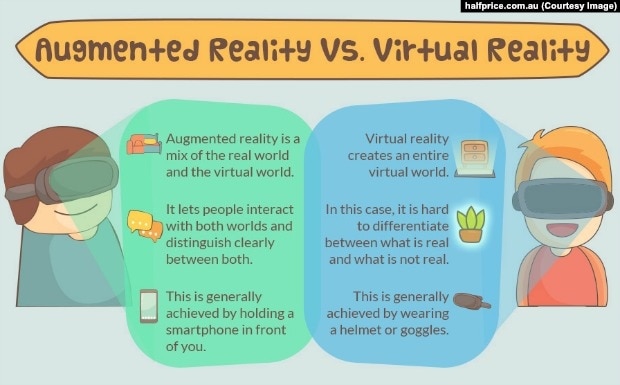
(Photo courtesy of: https://learningenglish.voanews.com/a/augmented-reality-versus-virtual-reality/3844772.html)

Metaverse allows users to use backgrounds, characters, and text to create an AR experience. The simplicity of the program and website allows users to be limited by only their creativity. For my own exploration, I have been using Metaverse to create an AR experience of my library. I would like to embed it in my website as a way for students and parents to tour the library from home in an AR format. It is not complete yet, but I hope to complete it and be able to share it out soon. From this project, I have discovered several important points. First, users can upload their own photos for content or characters. I was able to upload my bitmoji for use in my experience. Secondly, it is important to be prepared to create small steps. As someone who was more experienced with creating videos than creating an augmented reality experience, it took a moment for me to adjust and remember to include smaller steps, rather than trying to dive in all at once.
The website itself is very easy to use and has a wonderful amount of resources to help newbies such as myself get started. Although I greatly enjoy it, I am not sure that I will be able to use it with my students. Our district is very strict about which websites and programs our students use, and approval takes several steps. The only virtual reality program currently approved is Google Tour Creator, which I will have to familiarize myself with. I have no problem requesting approval for a new program, but I would like to look around a bit more and make sure it is the best fit. However, it is easy to see that a VR/AR program would be a unique and engaging addition to our school. Students and teachers could create standards-based reviews, games, tours, or lessons. My first thought goes to having students create movie trailers but as an AR immersion experience where they could introduce characters and plot in a way that really brings it to life. They could also focus on the technical aspect and broaden their ability to interact with varied websites. Overall, I am excited about this topic I am looking forward to finishing and sharing my project!


I explored this tool for my post the week as well. I had never heard of it before but saw all its potential for students and teachers. I love your idea of having students create movie trailers to introduce book characters. I am sure this is something they would enjoy. It is definitely more engaging than writing a character analysis. Good luck with the completion of your project. I would love to see how it turns out.
ReplyDeleteStephanie Sulton
I love the infographic you used explaining the difference between augmented reality and virtual reality. I also am excited to explore metaverse. This sounds really neat for teachers to be able to create their own content for an AR experience in the classroom. I also love how you are thinking about students creating their own content instead of just using teacher made content. Good luck on your Virtual Library project, it sounds awesome!
ReplyDelete